This service release applies only to those customers who send or receive material from/to an external program via the ANI WebTransfer gw.anionline.com connection managed by the OpenText operator. If you do not use this service (for example, only Heeros programs are in use), no action is needed. If you are unsure whether the connection is in use, please forward this information to your IT support, who can verify the matter.
The OpenText operator has reported the following:
Support for legacy OpenText™ Liaison ANI WebTransfer URLs ending July 25, 2025
Systems affected OpenText Liaison ANI WebTransfer
Details On July 25, 2025, from 14:00 to 15:00 GMT, OpenText will perform scheduled maintenance on Liaison ANI WebTransfer to prevent customers from connecting to the service via legacy URLs inetgw.anionline.com and gw.anionline.com.
Impact During the maintenance window: No outage or degradation of service is expected during the maintenance window. In the unlikely event that you experience a connectivity issue or degradation of service, you may contact your support service desk team.
After the maintenance window: Customers will be unable to establish a connection to the Liaison ANI WebTransfer service via legacy URLs inetgw.anionline.com and gw.anionline.com.
Action required before July 25, 2025 To ensure continued access to the Liaison ANI WebTransfer service, customers must complete the following steps:
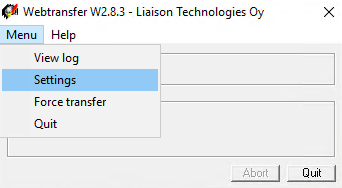
Start the ANI WebTransfer client.
Go to Menu > Settings.
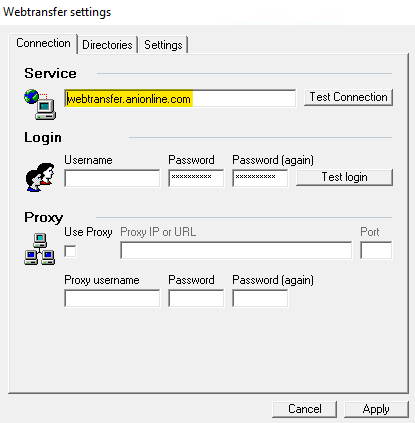
Change the URL in the “Service” field to webtransfer.anionline.com.
Click “Test Connection” to test connectivity.
If the connection test fails, click “Cancel” and check if any firewall rules are blocking connectivity to the new destination (80.88.183.75, port 443). Remove any such rules and try the connection again. If you have any questions, please contact the Support team at support.europe@opentext.com.
If the connection test is successful, click “Apply” to save the change.